
POS comparison guide
Square vs. Clover: Which POS Is Right for Your Business?
Square and Clover are both excellent point-of-sale systems. They just shine in different situations.
We sell, install and support both, so this guide lays out what each one can do, side by side, to help you find your best fit.
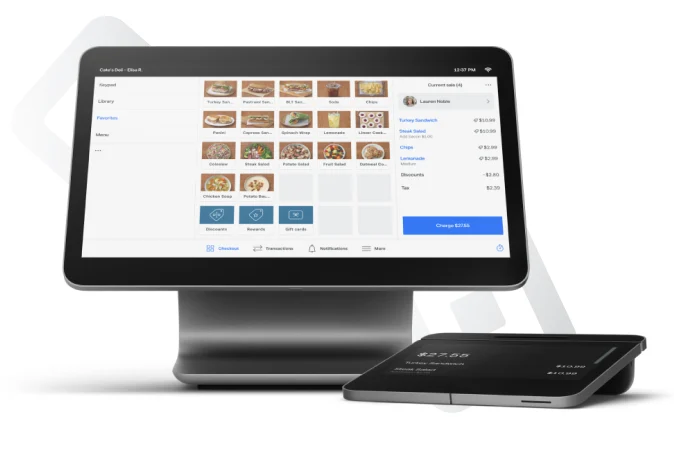 Square POS
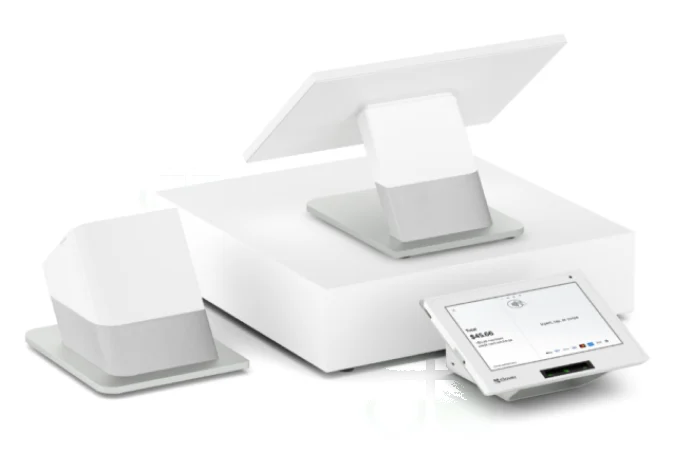 Clover POS
Quick answer
Square or Clover: the short version
You want simple, all-in-one and fast to start
Square is usually the easiest and lowest-cost way to get started. It’s a great fit for cafés, quick-service restaurants, food trucks, retail shops, salons and service businesses, especially if you also sell online.
You want premium hardware and flexible pricing
Clover is often the better fit for full-service restaurants and bars, and for businesses that want premium all-in-one countertop hardware, a large app market or a cash discount, dual pricing or surcharge program.
Comparison chart
Square vs. Clover features, side by side
Here’s what each platform can do. Both cover the essentials, so the right choice comes down to how you run your business.
| Feature | Square POS | Clover POS |
|---|---|---|
| Best known for | Simple setup, all-in-one tools, quick-service, retail and services | Full-service restaurants and bars, premium all-in-one hardware and flexible pricing programs |
| Ease of setup & training | Very easy, staff learn it in minutes | Easy, with more ways to customize |
| Free software plan | YesFree plan, with paid plans for more features | Paid monthly plan, often bundled with hardware |
| Use your own phone or iPad | YesFree app on iPhone, iPad and Android | YesWith the Clover Go reader |
| Countertop POS | YesSquare Register, Square Stand | YesStation Duo, Station Solo, Mini |
| Handheld POS | YesSquare Handheld | YesClover Flex |
| Card reader / terminal | YesSquare Reader, Square Terminal | YesClover Go, Clover Compact |
| Self-order kiosk | Yes | Yes |
| Kitchen display system | Yes | Yes |
| Table service, tabs & split checks | Yes | Yes |
| Online ordering | Yes | Yes |
| Online store / ecommerce | YesBuilt-in online store | Through online ordering and apps |
| Appointments & booking | YesSquare Appointments | Through Clover features and apps |
| Inventory management | Yes | Yes |
| Invoices | Yes | Yes |
| Customer loyalty & marketing | YesAdd-on tools | YesAdd-on tools and apps |
| Employee management | Yes | Yes |
| App marketplace | Yes | YesLarge app market |
| Offline payments | Yes | Yes |
| Local setup & training through Azura | Yes | Yes |
By business type
Square vs. Clover for your type of business
Square vs. Clover for restaurants
Both handle tables, tabs, kitchen tickets and online orders. Square is a natural fit for coffee shops, quick-service and food trucks. Clover is a favorite of full-service restaurants and bars that want premium countertop stations and tableside handhelds.
Often: Square for counter service, Clover for full service.
Square vs. Clover for retail
Both track inventory, scan barcodes and save customer profiles. Square stands out if you sell online too, with a built-in online store. Clover suits stores that want premium all-in-one countertop hardware and add-on apps.
Often: Square for shops that also sell online.
Square vs. Clover for salons & spas
Square Appointments makes online booking, reminders, deposits and tips simple. Clover can handle appointments through its features and apps.
Often: Square for appointment-based businesses.
Square vs. Clover for mobile & service businesses
Both can take payments on a phone. Square’s free app and invoices make it easy to get paid on the job. Clover Go pairs a small reader with your phone.
Often: Square for contractors and mobile pros.
Square vs. Clover for sports & concert venues
Both offer kiosks and handhelds for fast concessions and merch lines. The best setup depends on how many stands you run and how they connect.
Often: Depends on your layout. We’ll map it out.
Square vs. Clover for medical & professional
Both handle front-desk payments, invoices and cards on file. Square is simple for small offices. Clover can fit practices that want a countertop station.
Often: Square for small offices.
Pricing
How Square and Clover pricing works
Both charge for hardware, software and card processing, but they package it differently. Rates change, so we’ll price both for your business.
Start free, upgrade as you grow
- Free software plan, with paid plans for more features
- Flat, published card processing rates
- Lower-cost hardware, buy outright or finance
- Start with just a phone or iPad and a reader
Bundled plans with premium hardware
- Monthly software plan, often bundled with hardware
- Processing rates set by your merchant agreement
- Premium hardware with more built in
- Cash discount, dual pricing and surcharge options
See the details: what Square really costs and Clover pricing explained. Want real numbers? Book a free consultation and we’ll quote both side by side.
Still deciding?
Two great options. One local team to help you choose.
Square may be your fit if…
- You want the simplest setup and fastest training
- You run a café, quick-service, shop, salon or service business
- You want to sell in person and online in one system
- You want low upfront costs
Clover may be your fit if…
- You run a full-service restaurant or bar
- You want premium all-in-one countertop hardware
- You want kitchen displays and tableside handhelds
- You want a cash discount or surcharge program
FAQ
Square vs. Clover questions
Which is better, Square or Clover?
Neither is better for everyone. Square is usually the simpler, lower-cost option for cafés, quick-service restaurants, retail shops, salons and service businesses. Clover is often the better fit for full-service restaurants and bars, and for businesses that want premium countertop hardware, a large app market or a cash discount program. The best choice depends on how your business operates.
Is Square or Clover cheaper?
Square is often cheaper to start because it offers a free software plan and lower-cost hardware. Clover usually requires a monthly software plan and its hardware costs more, but it includes premium all-in-one hardware and flexible pricing programs. Your total cost depends on your hardware, plan and card volume, so we’ll price both for you.
Is Square or Clover better for restaurants?
Both work well for restaurants. Square is a great fit for coffee shops, quick-service and food trucks. Clover is popular with full-service restaurants and bars that want premium countertop stations, tableside handhelds and kitchen displays.
Is Square or Clover better for retail?
Both handle inventory, barcodes and customer profiles. Square stands out if you also want to sell online, since its online store is built in. Clover can suit stores that want premium all-in-one countertop hardware and add-on apps.
Can Square and Clover take payments offline?
Yes. Both Square and Clover have offline modes that let you keep taking card payments during an internet outage, with some limits set by each company.
Can I switch from Clover to Square, or Square to Clover?
Yes. We help Phoenix and Tucson businesses move their items, menus and settings to either platform and train their staff before the switch.
Does Azura sell both Square and Clover?
Yes. Azura Payments works with both, so we can recommend whichever fits your business best, then set it up and support it locally in Phoenix and Tucson.
Better rates and the right setup.
Book a free consultation with a local expert. We’ll review what you pay today and recommend the right setup for your business.
Free consultation
Tell us a little about your business. A local payments expert will reach out to help you choose the right setup.
No cost, no obligation. We never share your information.